
Abso Games
MapleStory M
Instant delivery

MapleStory M

Top up Maple M Cash Points and spend them on packages, gear, and everything else in-game. Pick a pack, verify your details, and your Cash Points land within seconds.

Launching soon

Top-ups are almost ready

MapleStory M Cash Points land here very soon. We're putting the finishing touches on instant delivery. Check back shortly.

Browse games

How to recharge with Abso

Four steps, seconds to finish

  1. 01

    Pick your pack

    Choose how many Maple M Cash Points you want from the packs above.

  2. 02

    Enter your details

    Add your Member Code and server, verify, then pick your world and character.

  3. 03

    Pay securely

    Check out through our hosted payment partner — no card details touch Abso.

  4. 04

    Play instantly

    Your Cash Points are credited to your account within seconds.

Good to know

Additional information

  • Each account can buy this product up to 5 times before the limit resets.
  • Reward Points are not granted for purchases made during a Reward Points event — they are granted when you spend your Cash Points instead.
  • Maple M Cash Points are an account-based currency used to buy in-game packages.
  • The purchase count for every product resets every Monday.
  • The exact package price in Cash Points is shown in the in-game purchase pop-up.
  • Regular transactions and Cash Point transactions cannot be combined — pick one method per purchase.

How to find your code

Find your MapleStory M Member Code

Your Member Code is the unique ID that links your top-up to the right account. Here's where to find it inside the game.
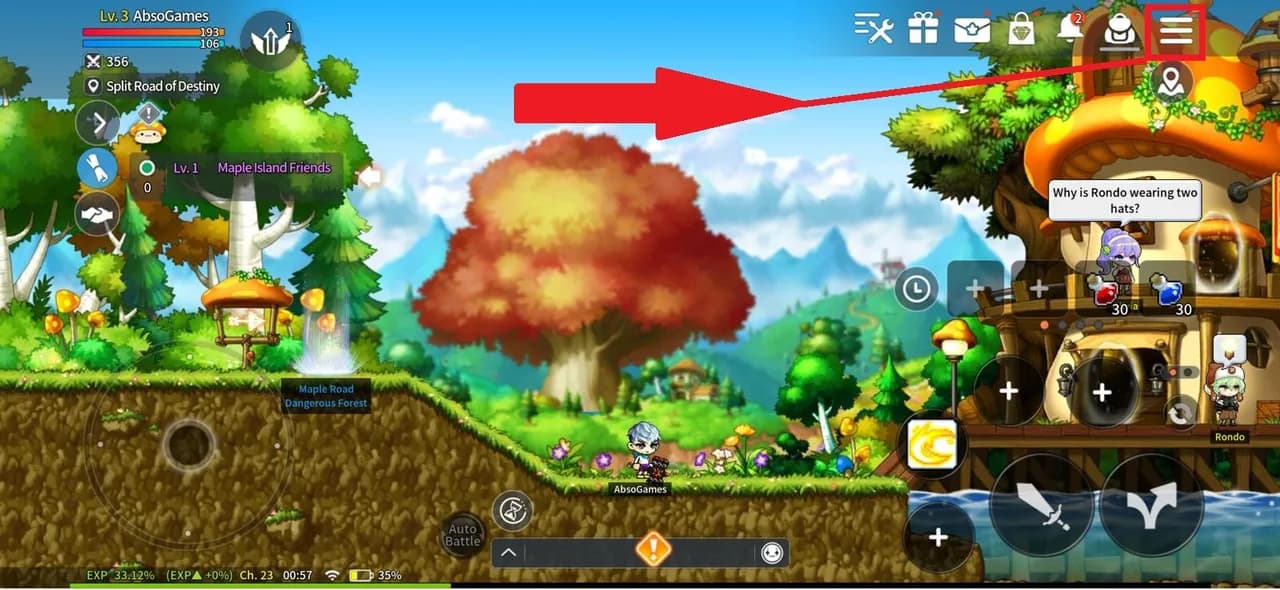
  1. 01

    Open the in-game menu

    Launch MapleStory M and tap the menu button in the top-right corner of your home screen.
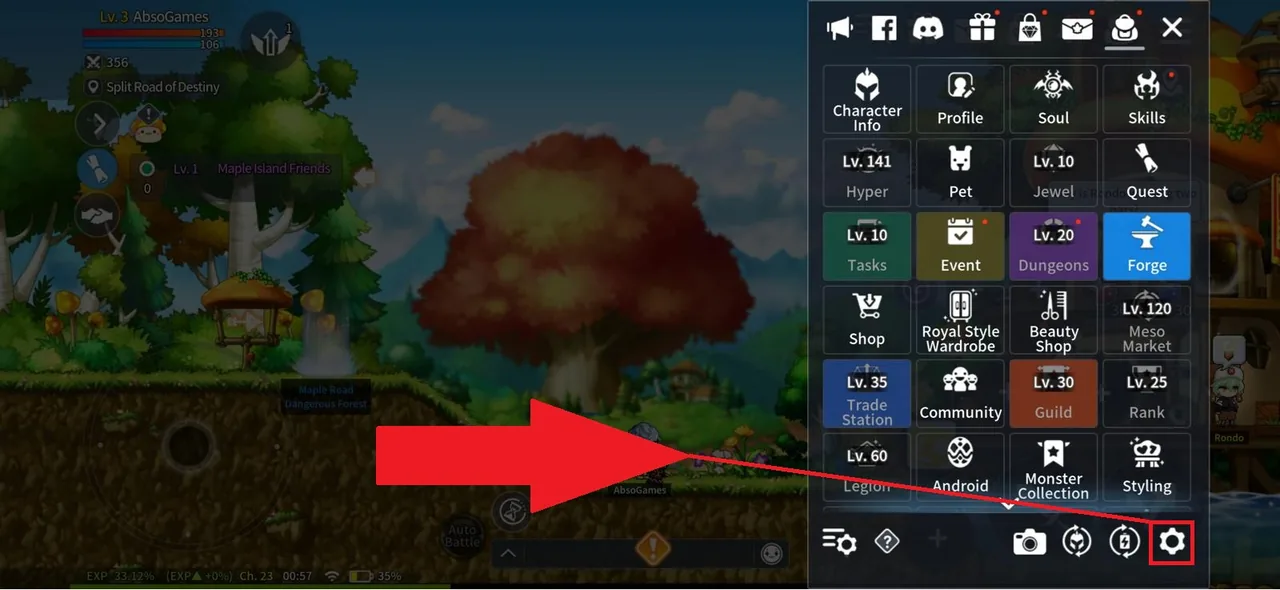
  2. 02

    Open Settings

    Inside the menu, tap the gear icon in the lower-right corner to open Settings.
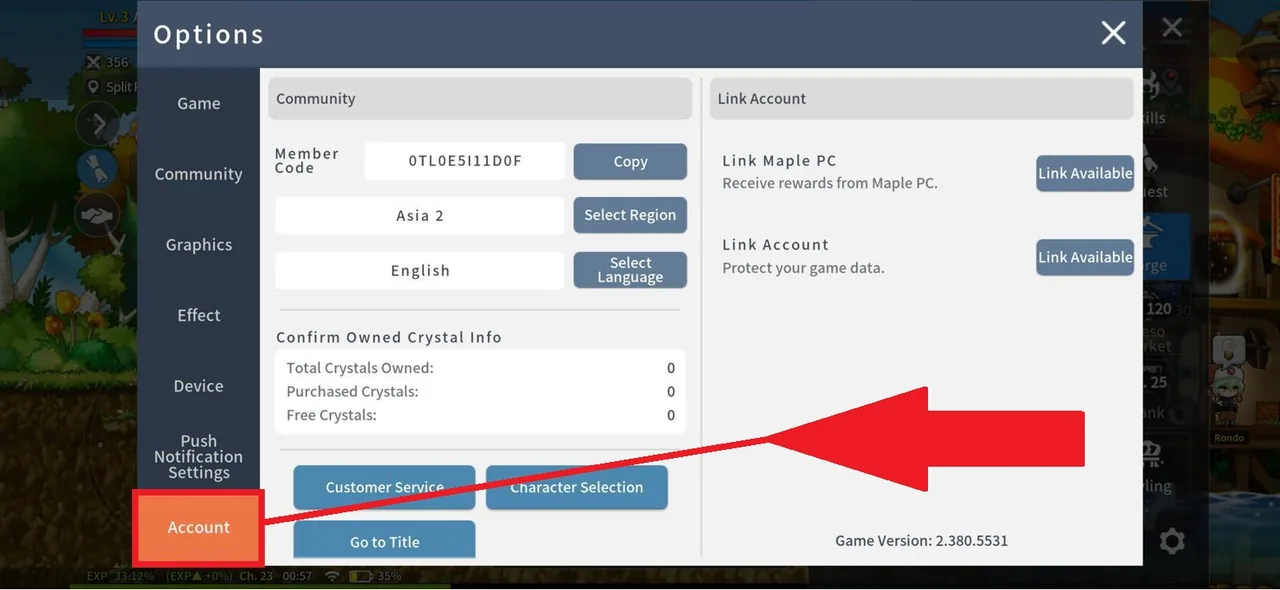
  3. 03

    Go to Account

    Select the Account tab from the Settings panel.
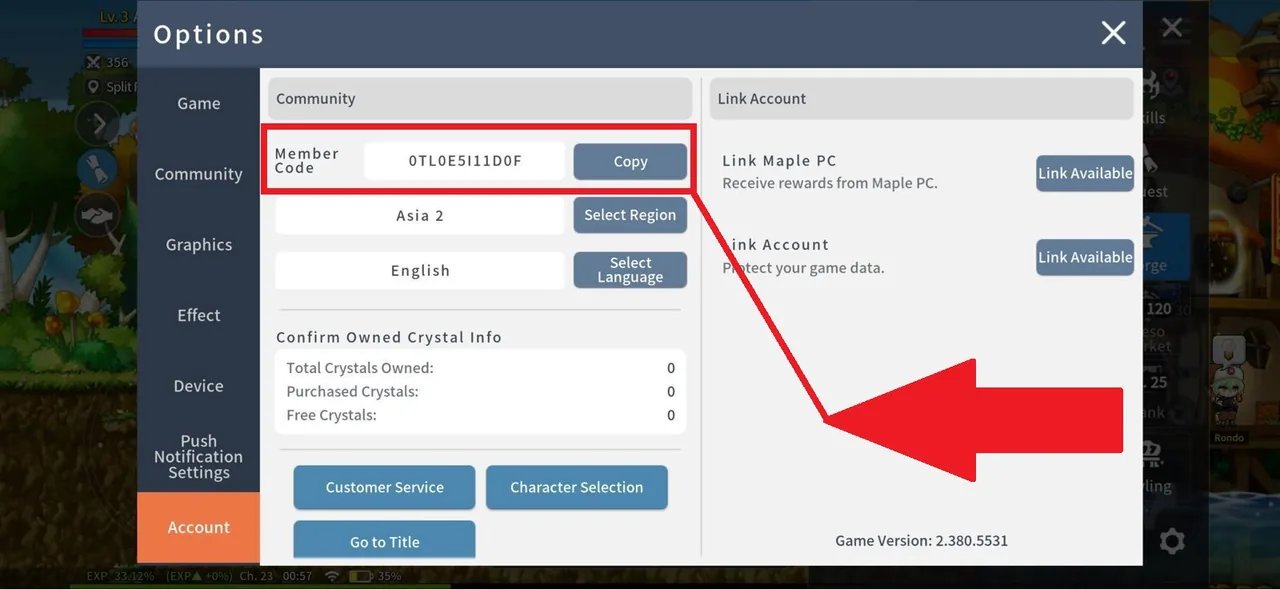
  4. 04

    Copy your Member Code

    Your Member Code and Server appear at the top of the Account screen. Note them down or tap to copy.

Heads-up

Your character name must match your in-game nickname exactly. The Member Code identifies your account; the character name routes Cash Points to the right hero.

Frequently asked

Questions, answered

  • How fast will my Cash Points arrive?
    Most top-ups land in seconds. You'll get an email confirmation once Maple M has credited your account.
  • What do I need to enter at checkout?
    Your Member Code, server, world, and character name. The "Find your Member Code" guide above shows where to find them in-game.
  • What if I enter the wrong Member Code?
    Cash Points are credited to the account matching the code you provide, so double-check before paying. If something goes wrong, contact us with your order ID right away.
  • Is my payment information safe?
    Yes. Cards are handled entirely by our hosted payment partners — Abso never sees or stores your card details.
  • What if my Cash Points don't show up?
    Check the email confirmation first. If it's been more than a few minutes and nothing has arrived, reach out with the order ID and we'll investigate.
  • Can I get a refund?
    Failed orders auto-refund to your original payment method. Successful top-ups sent to the wrong account need a manual review — see our Refunds page for details.